Motion design for LinkedIn: reaching your B2B audience
LinkedIn is different. Your video must be too
On Instagram, video can be entertainment.
On LinkedIn, it must be professional conversation.
Motion design on LinkedIn isn’t about impressive effects. It’s about communicating value quickly to busy decision-makers.
Characteristics of LinkedIn video
Duration: 30-60 seconds. Max.
Script: Problem → Solution → Benefit. Done.
Visual: Professional but human. Not robotic.
Audio: Clear narration. No cheesy electronic music.
CTA: Direct. “See our case”, “Download the guide”, “Book a call.”
5 types that work on LinkedIn
1. Case study: “How we increased sales 40% in 30 days” 2. Education: “3 mistakes your campaign is making” 3. Trend explainer: “Why vertical video will explode in 2026” 4. Founder story: You talking about creative process 5. Results: Client testimonial video
The structure that works
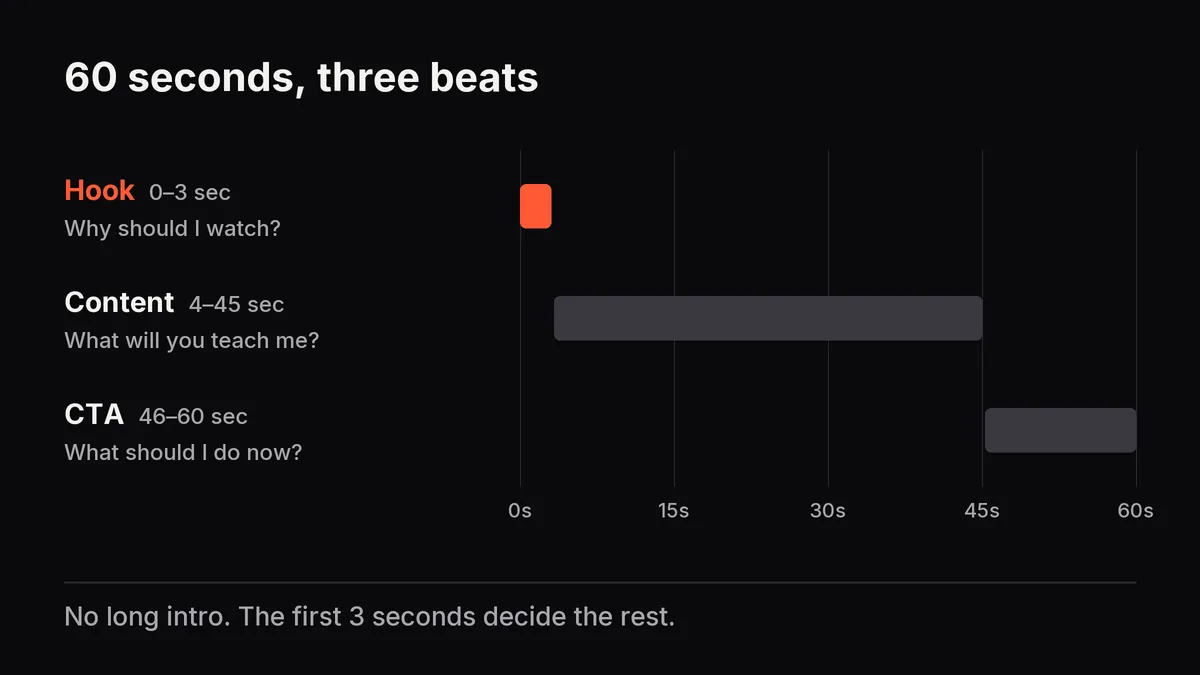
0-3 sec: Hook. Why should I watch? 4-45 sec: Content. What will you teach me? 46-60 sec: CTA. What should I do now?
No fluff. No long intro. Direct.
Technical requirements
- Sync with text (not everyone has sound on)
- Big text (readable on phone)
- Contrast colors (readable in feed)
- Always add captions
One video with 500 views and 80% watching all the way is better than 5000 with 20% completing.
Which type of LinkedIn content performs best for your industry?